![Multishoping.eu [logo]](https://www.multishoping.eu/Images/loga/td.jpg)
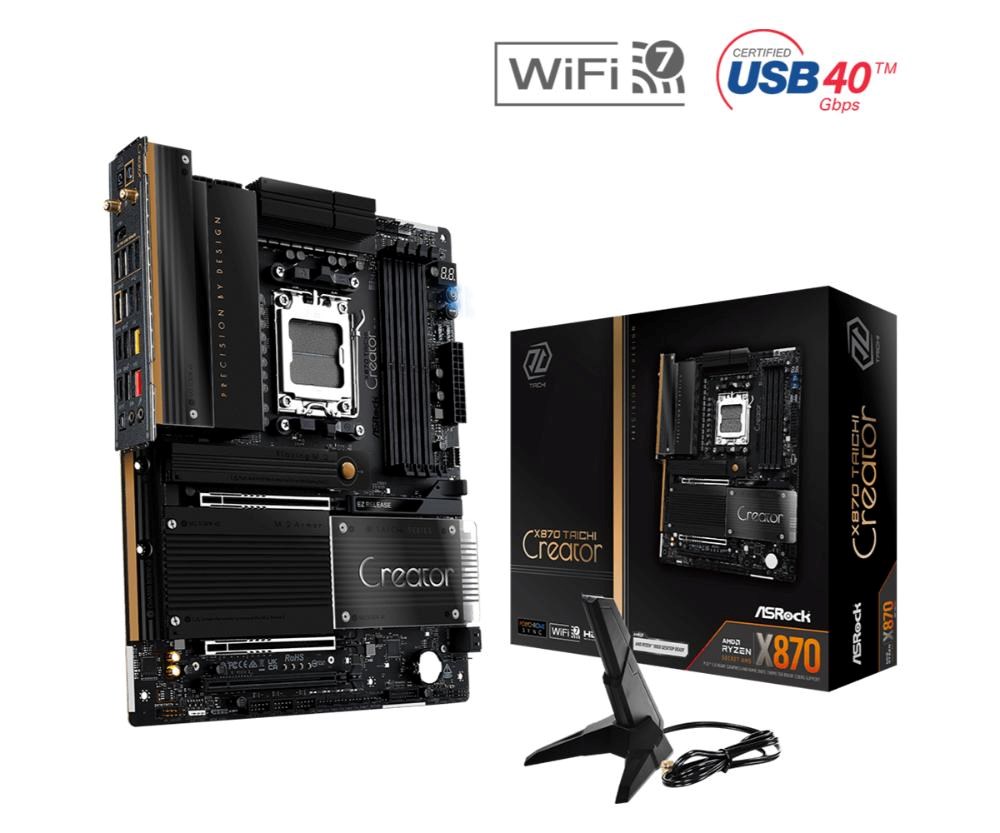
ASRock MB Sc AM5 X870 TAICHI Creator, AMD X870, 4xDDR5, 1xHDMI, 2xUSB4, WI-FI, ATX


Formát základní desky:ATX; Chipset:AMD X870; Socket (patice):Socket AM5 (LGA 1718); Pro procesory:AMD; Technologie paměti RAM:DDR5; Počet paměťových slotů:4; M.2 slot:4; SATA 3:4; Podpora RAID:0, 1, 10; PCI Express x16:3; Bezdrátové připojení:WiFi + Bluetooth; DisplayPort:0; HDMI:1; VGA:0; DVI:0; Počet Thunderbolt:2; USB 2:8; USB 3:7; USB C:2; Led Header
Podrobnosti
ASROCK X870 TAICHI CREATOR
The X870 Taichi Creator features 10GbE and 5GbE LAN, dual USB4 Type-C, dual Gen5 M.2 slots, and dual PCIe 5.0 x16 slots with extra spacing for dual-GPU setups.
Its sharp lines, metallic edges, and mirrored nameplate reflect the signature Taichi Creator style—precision meets elegance.
Unique Feature
Superb Productivity
- PCIe Gen5 (Graphics, M.2)
- Dual Channel DDR5
- USB4 Type-C Ports (40 Gb/s)
Rock-Solid Durability
- 18+2+1 Power Phase, 80A SPS for Vcore+SOC with Enlarged Heatsink Armor
- Flexible Integrated I/O Shield
- 20K Long-lasting Black Caps (high quality and conductive polymer capacitors) Ultrafast Gaming
- Marvell (Aquantia) 10GbE LAN, 5G LAN, 802.11be Wi-Fi 7 Module
EZ Update
- BIOS Flashback Button
- ASRock Auto Driver Installer
CPU
- Supports AMD Socket AM5 Ryzen™ 9000, 8000 and 7000 Series Processors*
* The availability of expansion slots may vary by CPU. Please refer to PCIe/M.2 Bandwidth Table for details.
Chipset
- AMD X870
Memory
- Dual Channel DDR5 Memory Technology
- 4 x DDR5 DIMM Expansion Slots
- Supports DDR5 ECC/non-ECC, un-buffered memory up to 8000+(OC)*
- Max. capacity of system memory: 256GB
- Supports Extreme Memory Profile (XMP) and EXTended Profiles for Overclocking (EXPO) memory modules*
* Please refer to Memory Support List on ASRock's website for more information.
BIOS
- 512Mb AMI UEFI Legal BIOS with GUI support
Graphics
Integrated AMD RDNA™ graphics (Actual support may vary by CPU)
- 1 x HDMI 2.1 TMDS/FRL 8G Compatible, supports HDR, HDCP 2.3 and max. resolution up to 4K 120Hz
- 2 x USB4, support HDCP 2.3 and max. resolution up to 8K 30Hz*
* Only the CPU's embedded graphics can be displayed through USB4 ports.
If you want to display to a Type-C monitor, please use AM5 Ryzen™ 9000, 8000 and 7000 processors with embedded graphics.
USB4 controller(for USB4_TC1 and USB4_TC2) will run at Gen4x2 with with 8000 (Phoenix 2) series processors.
Audio
- 7.1 CH HD Audio with Content Protection (Realtek ALC4082 Audio Codec)
- Individual PCB Layers for R/L Audio Channel
- Nahimic Audio
LAN
1 x 10 Gigabit LAN 100/1000/2500/5000/10000 Mb/s (Marvell (Aquantia) AQC113)
- Support Wake-On-LAN
- Support PXE 1 x 5 Gigabit LAN 10/100/1000/2500/5000 Mb/s (Realtek RTL8126)
Wireless Communication module
- 802.11be 2x2 Wi-Fi 7 Module
- Supports IEEE 802.11a/b/g/n/ac/ax/be
- Supports 2.4GHz/5GHz/6GHz* frequency band
- Supports 160MHz channel bandwidth with 6GHz* frequency band
- 1 antenna to support 2 (Transmit) x 2 (Receive) diversity technology
- Supports Bluetooth 5.4
- Supports MU-MIMO
* The Wi-Fi 7 module is supported by Microsoft Windows 11 only. There is no driver available for Windows 10. The availability of the 6GHz band will depend on the different regulation status of each country and region. It will be activated (for supported countries) through Windows Update and software updates once available.
Expansion Slots
CPU:
- 2 x PCIe 5.0 x16 Expansion Slots (PCIE1 and PCIE2), support x16 or x8/x8 modes*
Chipset:
- 1 x PCIe 3.0 x16 Slot (PCIE3), supports x4 mode*
- 1 x Vertical M.2 Socket (Key E), supports type 2230 WiFi/BT PCIe WiFi module
* PCIE1 will run at Gen5x16 with 9000 and 7000 series processors, Gen4x8 with 8000 (Phoenix 1) series processors and Gen4x4 with 8000 (Phoenix 2) series processors.
If M2_4 is occupied, both PCIE3 and M2_4 will downgrade to x2 mode.
Supports NVMe SSD as boot disks
Storage
CPU:
- 1 x Blazing M.2 Socket (M2_1, Key M), supports type 2280 PCIe Gen5x4 (128 Gb/s) mode*
- 1 x Blazing M.2 Socket (M2_2, Key M), supports type 2280 PCIe Gen5x4 (128 Gb/s) mode*
Chipset:
- 1 x Hyper M.2 Socket (M2_3, Key M), supports type 2280 PCIe Gen4x4 (64 Gb/s) mode*
- 1 x Ultra M.2 Socket (M2_4, Key M), supports type 2280 PCIe Gen3x4 (32 Gb/s) mode*
ASMedia ASM1164:
- 4 x SATA3 6.0 Gb/s Internal I/O Connectorss
* Supports NVMe SSD as boot disks
M2_1 is the first priority for M.2 installation.
M2_1 will run at Gen5x4 with 9000 and 7000 series processors and Gen4x4 with 8000 (Phoenix 1 and Phoenix 2) series processors.
M2_2 will run at Gen5x4 with 9000 and 7000 series processors and Gen4x4 with 8000 (Phoenix 1) series processors. M2_2 will be unavailable with 8000 (Phoenix 2) series processors.
If M2_2 is occupied, both rear USB4 Type-C Ports and M2_2 will downgrade to x2 mode. You can switch M2_2 to x4 mode in BIOS setting, but doing so will disable USB4_TC1 and USB4_TC2.
If M2_4 is occupied, both PCIE3 and M2_4 will downgrade to x2 mode.
RAID
- Supports RAID 0, RAID 1 and RAID 10 for M.2 NVMe storage devices
USB
CPU:
- 2 x USB4 Type-C (Rear)
- 1 x USB 3.2 Gen2 Type-A (Rear (USB32_8))
- 4 x USB 3.2 Gen1 Type-A (Rear (USB32_1234))
Chipset:
- 1 x USB 3.2 Gen2x2 Type-C (Front)
- 1 x USB 3.2 Gen2 Type-A (Rear (USB32_7))
- 6 x USB 3.2 Gen1 Type-A (2 Rear (USB32_56), 4 Front)
- 8 x USB 2.0 (2 Rear, 6 Front)
* All USB ports support ESD Protection
Internal I/O Connectors
- 1 x Thermistor Cable Header
- 1 x Power LED and Speaker Header
- 1 x RGB LED Header*
- 3 x Addressable LED Headers**
- 2 x CPU Fan Internal I/O Connectors (4-pin) (Smart Fan Speed Control)***
- 4 x Chassis Fan Internal I/O Connectorss (4-pin) (Smart Fan Speed Control)***
- 1 x AIO Pump Fan Internal I/O Connectors (4-pin) (Smart Fan Speed Control)***
- 1 x 24 pin ATX Power Internal I/O Connectors (Hi-Density Power Internal I/O Connectors)
- 2 x 8 pin 12V Power Internal I/O Connectorss (Hi-Density Power Internal I/O Connectors)
- 1 x Front Panel Audio Internal I/O Connectors (15µ Gold Audio Internal I/O Connectors)
- 3 x USB 2.0 Headers (Support 6 USB 2.0 ports)
- 2 x USB 3.2 Gen1 Headers (Support 4 USB 3.2 Gen1 ports)
- 1 x Front Panel Type C USB 3.2 Gen2x2 Header (20 Gb/s)****
- 1 x Dr. Debug with LED
- 1 x Power Button with LED
- 1 x Reset Button with LED
* Supports in total up to 12V/3A, 36W LED Strip
** Support in total up to 5V/3A, 15W LED Strip
*** CPU_FAN1 supports the fan power up to 1A (12W).
CPU_FAN2, CHA_FAN1~4 and AIO_PUMP support the fan power up to 3A (36W).
CPU_FAN2, CHA_FAN1~4 and AIO_PUMP can auto detect if 3-pin or 4-pin fan is in use.
**** Supports USB PD 3.0 up to 12V@3A (36W) charging
Back Panel I/O Ports
- 2 x Antenna Ports
- 1 x HDMI Port
- 1 x Optical SPDIF Out Port
- 2 x USB4 Type-C Ports (40 Gb/s)*
- 2 x USB 3.2 Gen2 Type-A Ports (10 Gb/s)
- 6 x USB 3.2 Gen1 Type-A Ports (USB32_1234 supports Ultra USB Power.)**
- 2 x USB 2.0 Ports
- 2 x RJ-45 LAN Ports
- 1 x Clear CMOS Button
- 1 x BIOS Flashback Button
- 1 x Line Out Jack (Gold Audio Jack)
- 1 x Microphone Input Jack (Gold Audio Jack)
* Supports USB PD 3.0 up to 5V@3A (15W) charging
USB4 controller(for USB4_TC1 and USB4_TC2) will run at Gen4x2 with with 8000 (Phoenix 2) series processors.
** Device exceeds USB 3.2 Type-A power rating of 5V@0.9A (4.5W) may trigger over-current protection (OCP), will require system reboot to restore USB power.
Software and UEFI
Software
- ASRock Motherboard Utility (A-Tuning)
- ASRock Polychrome SYNC*
UEFI
- ASRock EZ Mode
- ASRock Full HD UEFI
- ASRock Auto Driver Installer
- ASRock Instant Flash
*These utilities can be downloaded from ASRock Live Update & APP Shop.
Accessories
- 4 x SATA Data Cables
- 1 x ASRock WiFi 2.4/5/6 GHz Antenna
- 1 x ARGB Splitter Cable
- 1 x Thermistor Cable
Form Factor
- ATX Form Factor: 12.0-in x 9.6-in, 30.5 cm x 24.4 cm
- 8 Layer PCB
OS
- Microsoft Windows 10 64-bit / 11 64-bit
Certifications
- FCC, CE
- ErP/EuP ready (ErP/EuP ready power supply is required)
- CEC Tier II ready
Technické parametry
| Pro procesory | AMD |
|---|---|
| Počet paměťových slotů | 4 |
| 3.5mm Jack | Ano |
| DisplayPort | 0 |
| Bezdrátové připojení | WiFi + Bluetooth |
| Led Header | Ano |
| TPM | Ne |
| USB 2 | 8 |
| USB 3 | 7 |
| USB C | 2 |
| M.2 slot | 4 |
| SATA 3 | 4 |
| VGA | 0 |
| DVI | 0 |
| HDMI | 1 |
| Počet Thunderbolt | 2 |
| LPT port | Ne |
| Socket (patice) | Socket AM5 (LGA 1718) |
| Formát základní desky | ATX |
| Chipset | AMD X870 |
| Technologie paměti RAM | DDR5 |
| PCI Express x16 | 3 |
| Podpora RAID | 0 |